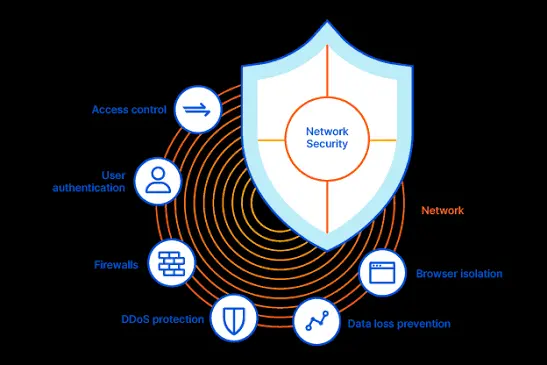

A firewall definition might sound deceptively simple. It is a security system that controls network traffic. Still, that short explanation leaves out the real work happening beneath the surface.
At the outset, firewalls do the following:
- Inspect connections
- Apply security policies
- Reject suspicious requests
- Help prevent unauthorized access before it spreads deeper into a network.
That matters because modern networks rarely have one clear boundary. In general, employees connect through office devices, home routers, and cloud applications. Also, they use mobile phones and third-party platforms.
Consequently, a firewall is no longer just a digital wall around a building. Rather, it is a policy-enforcement point placed wherever traffic poses a risk.
What Does a Firewall Actually Do?
Primarily, a practical firewall definition and network protection strategy gives administrators a positive, manageable way to decide which connections deserve trust. It does not allow every request to investigate problems later. Instead, a firewall checks traffic against predefined rules before permitting it to continue.
Those rules may examine the following areas:
- Source addresses
- Destination addresses
- Port numbers
- Protocols
- Applications
- Users
- Connection behavior.
For example, an organization might allow employees to access a cloud platform. Meanwhile, it might block unknown devices from reaching an internal database. Although it is a simple idea on paper, it is much trickier once hundreds of services start communicating.
However, a firewall does not automatically understand business priorities. Administrators must configure it with accurate policies.
Therefore, its effectiveness depends on –
- The quality of the rules
- Network visibility
- Timely updates
- Sensible placement.
In fact, a powerful firewall with careless configuration can leave large gaps.
How Firewall Traffic Filtering Works
Primarily, network communication travels in packets. These contain addressing information and data segments. Basically, a firewall examines those packets at different levels.
In fact, basic models inspect packet headers. Meanwhile, more advanced systems analyze connection states and applications. Sometimes, they analyze the content moving through them.
When traffic reaches the firewall, the system compares it with an ordered rule set.
- A permitted request moves forward.
- A prohibited request gets blocked or rejected.
Meanwhile, the firewall may do the following:
- Record the event
- Alert a security team
- Send information to another monitoring platform for deeper investigation.
This process supports the principle of least privilege. In other words, users, devices, and applications receive only the network access they genuinely require.
Consequently, unnecessary communication paths disappear. This gives attackers fewer convenient routes to exploit.
Major Types of Firewalls
To be honest, not every firewall evaluates traffic in the same way. Some provide fast, limited filtering. Others inspect context and application behavior. However, that deeper analysis may require more processing power and careful configuration.
| Firewall Type | How It Works | Best-Fit Use |
| Packet-filtering firewall | Checks addresses, ports, and protocols against fixed rules | Basic network filtering and low-complexity environments |
| Stateful inspection firewall | Tracks active connections and evaluates packets within their communication state | Business networks requiring stronger contextual control |
| Proxy firewall | Receives traffic on behalf of another system and separates both endpoints | Environments needing isolation and application-level inspection |
| Next-generation firewall | Combines stateful filtering with application awareness, threat detection, and identity controls | Complex networks, cloud environments, and advanced security programs |
| Host-based firewall | Runs directly on an endpoint and controls traffic entering or leaving that device | Laptops, servers, remote systems, and individual workloads |
The right option depends on the environment. For instance, a small office may need straightforward perimeter filtering and endpoint controls.
However, an enterprise handling cloud workloads, remote access, and sensitive records is different. Usually, it needs the following:
- Layered inspection
- Centralized management
- Detailed activity logs.
How Firewalls Protect a Network
The most useful firewall definition focuses on controlled access rather than complete isolation. Networks must communicate to remain productive.
Therefore, the firewall’s job is to permit legitimate activity. Meanwhile, it must also reduce exposure to traffic that lacks a valid operational reason.
In practice, a properly configured firewall can:
- Block unauthorized connection attempts from external networks.
- Restrict access to sensitive servers and internal applications.
- Separate the following areas:
- Departments
- Workloads
- Security zones.
- Limit outbound communication from compromised devices.
- Record traffic patterns for monitoring and incident analysis.
- Enforce application, protocol, and user-based access policies.
Furthermore, segmentation deserves particular attention. If an attacker compromises one workstation, internal firewall rules might prevent easy movement toward –
- Payroll systems
- Customer records
- Administrative servers.
Thus, the firewall helps contain damage rather than merely guarding the outer edge.
Outbound filtering matters as well. Many organizations focus heavily on incoming attacks but overlook traffic leaving the network. However, malware may attempt to contact command servers or transfer stolen information externally.
In fact, egress rules can interrupt that communication and create an early warning for security teams.
What a Firewall Cannot Do Alone
Obviously, a firewall is not a complete cybersecurity program. It cannot fix –
- Weak passwords
- Unpatched software
- Excessive user permissions
- An employee approving a deceptive login request.
Likewise, encrypted traffic may hide malicious activity unless appropriate inspection capabilities are in place.
Also, configuration drift creates another concern. Temporary rules sometimes remain active long after projects end. Meanwhile, duplicated or overly broad policies make the rule base harder to audit.
As a result, teams should –
- Review firewall rules regularly
- Remove obsolete entries
- Document exceptions
- Test whether controls still match business requirements.
Apart from that, firewalls also need support from –
- Endpoint protection
- Identity management
- Multifactor authentication
- Vulnerability management
- Backups
- Security monitoring.
Layering these controls creates resilience. If one safeguard fails, another might still detect, slow, or contain the threat.
Choosing and Managing a Firewall
Selection should begin with traffic requirements, not a long feature list. Basically, administrators need to identify –
- Critical assets
- Expected communication paths
- Remote-access needs
- Compliance obligations
- Acceptable performance overhead.
Otherwise, the organization may buy advanced technology without building usable security policies around it.
After deployment, logs should feed into a consistent review process. In fact, the following issues reveal misconfiguration or malicious behavior:
- Repeated denied requests
- Unusual outbound connections
- Unexpected application traffic.
Still, more alerts do not automatically mean better protection. Useful monitoring depends on context, prioritization, and people who can investigate what the system finds.
A Firewall Creates Control Rather Than Absolute Safety
Ultimately, a firewall definition should describe a system that evaluates network communication and enforces access decisions according to security policy. It protects networks by –
- Filtering traffic
- Limiting exposure
- Supporting segmentation
- Producing evidence when suspicious activity occurs.
Even so, the firewall works best as part of a broader defensive structure. Careful rules, regular reviews, endpoint safeguards, identity controls, and responsive monitoring all matter. The technology provides the gate.
Sound security practice decides who gets through and why access exists. Also, it is about what happens when something looks wrong.
Also Read-How Can My Business Save on Fuel Costs?







Leave a Comment