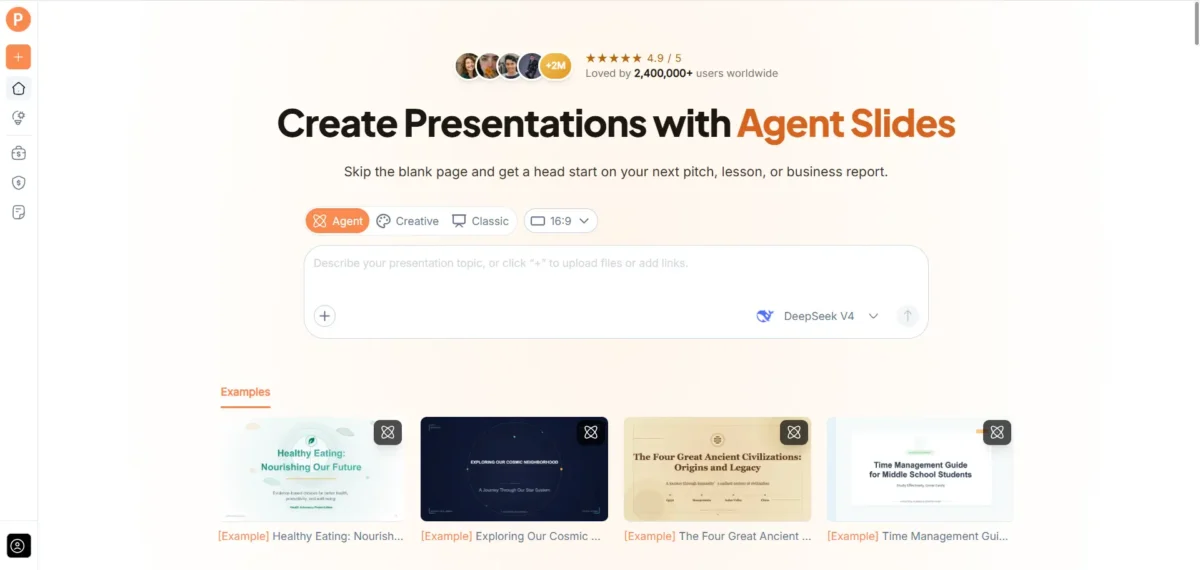

A presentation tool becomes useful when it meets you where the work already exists. That might be a document, a set of notes, or a rough explanation of an idea. AI PPT Maker brings those starting points into a workflow built around presentation creation.
Its appeal is the combination of content input, outline review, and different ways to generate slides. You can supply material, explain what the presentation needs to achieve, and choose an approach that fits the finished deliverable.
For anyone adding a new AI tool to their shortlist, that combination deserves a closer look.
The Product Starts Before the First Slide
Existing Material Can Become the Foundation
AI PPT Maker accepts text and uploaded documents, including DOC, DOCX, and PDF files. It also supports webpage and video sources.
That gives the product a practical starting point. A manager can bring a report, a student can use project notes, and a teacher can begin with existing lesson material.
The source does not need to resemble a presentation already. You provide the information and explain the intended use. AI PPT Maker helps develop a slide draft from that foundation.
Your Instructions Give the Material a Purpose
A document may contain useful information without explaining what an audience needs to hear.
Additional instructions can supply that missing context: who will attend, what they already know, and which points matter most.
For example, a report might need to become a short introduction rather than a detailed review. Tell AI PPT Maker that difference.
The product is more useful when the request describes the communication task, not simply the subject. The same source can support several presentations, depending on the purpose.
Mixed Input Keeps the Brief Flexible
Agent, Creative, and Classic all support mixed input.
You can combine source material with text instructions instead of rewriting everything into one long prompt.
That matters when the document supplies the facts but your notes explain the meeting’s priorities. It also helps when a source needs a qualification or a term requires explanation.
Identify the role of each source. AI PPT Maker can organize the material more clearly when it knows which information is current and which is background.
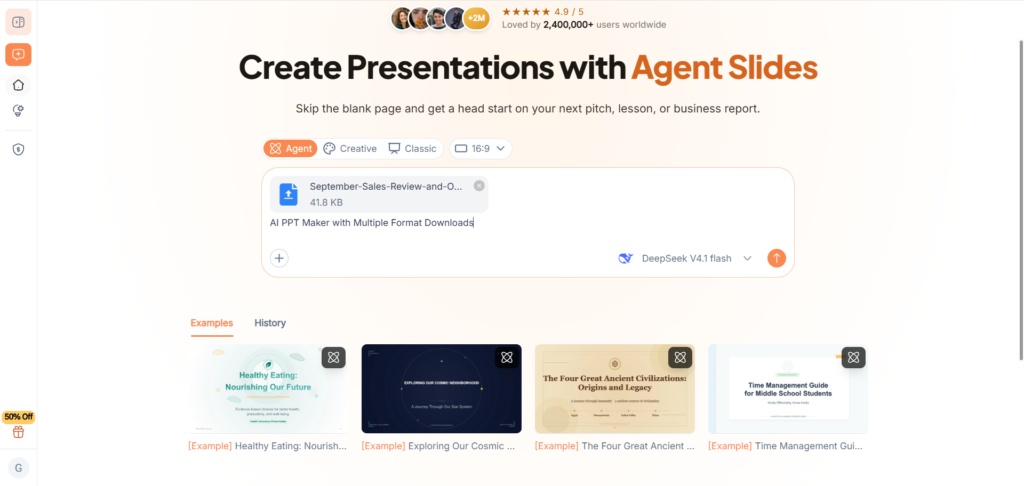
(Combine files and instructions with AI PPT Maker)
Three Modes Give the Product Its Range
Agent Develops the Brief Through Conversation
Agent mode supports multi-round conversation.
The first request can establish the basics, while later messages add context or clarify emphasis.
A founder might explain which concern the audience has raised. A researcher might identify the finding that needs more attention.
Agent also includes AI image generation and exports PPTX for continued work in PowerPoint.
This is a useful combination for presentations that develop through discussion. The brief can improve as gaps become visible, rather than depend on one perfectly written opening prompt.
Creative Emphasizes Visual Expression
Creative offers a visually expressive approach and exports PNG images.
That can suit concept presentations and other work where the finished visual page is useful.
The format is important. PNG output is different from editing individual text elements in PowerPoint.
Choose Creative when its visual approach and output fit the task. If you expect repeated wording changes in PowerPoint, consider a PPTX workflow instead.
AI PPT Maker’s variety is valuable when the mode choice follows the deliverable, rather than appearance alone.
Classic Provides a Template-Based Route
Classic uses templates, with more than 1,000 available through AI PPT Maker.
That offers a visual framework for people who want a consistent presentation without designing every page independently.
Classic supports PPTX downloads and additional options including PDF, Keynote, outlines, and images.
For recurring updates or structured explanations, this can be a practical route. Select a template that gives the actual content enough space, then check the exported result rather than relying only on the preview.
The Outline Is an Important Part of the Product
Structure Can Be Reviewed Before Generation
All three modes let you review and adjust the outline before generating slides.
This is one of the most useful features to understand early.
A draft outline makes the sequence visible. You can see whether the main point appears at the right time, whether sections repeat, and whether essential context is missing.
AI PPT Maker gives the user a place to make those decisions before visual design makes the presentation feel complete.
A Source Document’s Order Is Not Always Suitable
Reports often provide background before conclusions. A presentation may need to introduce the main finding earlier.
Likewise, a proposal may need to explain the audience’s problem before listing services.
Use outline review to assess that difference. The product can organize the material, but the intended audience determines whether the route works.
This is especially useful for people adapting written information into something that will be spoken aloud.
Accuracy Still Needs a Source Check
A polished draft should be compared with the material supplied.
Verify names, dates, figures, and qualifications. Keep estimates labelled and proposed actions separate from approved decisions.
The product’s value is a starting point you can inspect and develop.
A sensible first evaluation uses content you know well, because you can identify omissions and incorrect emphasis without needing to investigate every statement from scratch.
The Finished File Determines Practical Fit
Downloads Support Different Next Steps
Agent and Classic support PPTX for further editing in PowerPoint. Creative exports PNG images.
Classic also offers PDF, Keynote, and outline downloads in TXT or Markdown.
Those choices matter after generation. A consultant may need detailed edits, while a creator may want finished visual pages.
AI PPT Maker should be assessed as a complete workflow: input, structure, generation, review, and delivery. The best-looking preview is only one part of that assessment.
Language and Sharing Add Useful Options
AI PPT Maker supports multilingual output.
Agent also supports sharing a conversation link, which can help a colleague understand the context behind the brief.
These capabilities extend the workflow, but their roles should remain clear. Language output needs review, and conversation sharing should not be assumed to provide live co-editing.
Use each feature for a defined purpose. That makes the product easier to evaluate against your actual needs.
The Product Is Worth a Familiar First Task
Other options include PPT Maker and NoteGPT’s AI Slide Generator. AI PPT Maker stands out as a candidate for people who want several ways to turn existing information into presentation material.
AI PPT Maker offers a flexible introduction to AI-assisted slide creation. Give AI PPT Maker(https://aipptmaker.ai/) a familiar source and a clear purpose, then assess the outline and download. Keep PPT Maker(https://pptmaker.io/) in mind as another option while finding the workflow that fits your work.
Also Read
- https://grammerway.com/is-chiropractic-care-effective-for-back-pain-what-to-know-before-your-first-visit/
https://grammerway.com/5-signs-its-time-to-build-a-custom-home-instead-of-buying/
https://grammerway.com/top-8-billing-platforms-for-orthotics-and-prosthetics-providers/





Leave a Comment