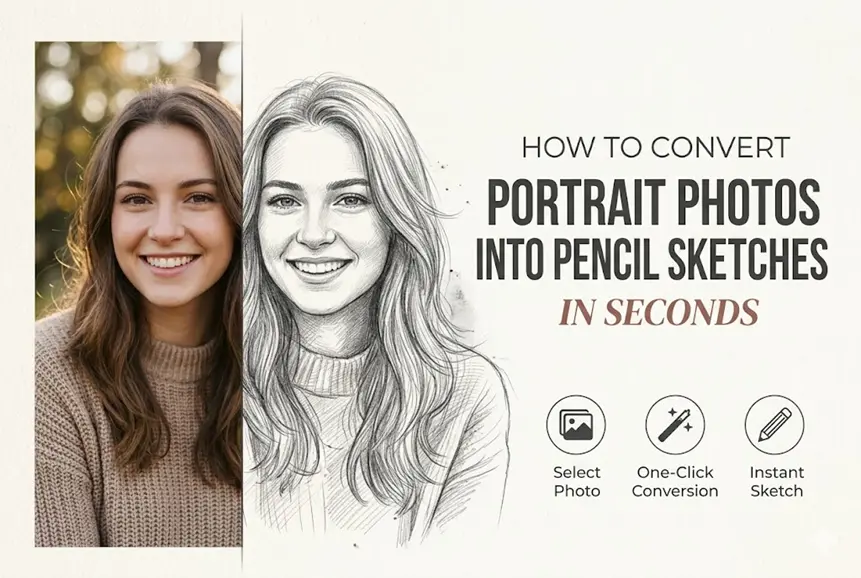

Portrait photography captures detail—skin texture, lighting, expression—but sometimes that level of realism isn’t what you need. A pencil sketch strips things back. It highlights structure, emotion, and form in a way that feels more intentional and artistic.
That’s why more people are turning to photo to sketch tools specifically for portraits. Whether you want a stylized profile picture, a base for drawing, or something printable, converting a portrait into a pencil sketch is one of the fastest ways to transform an image without losing its essence.
Why Pencil Sketch Works So Well for Portraits
Not all images translate equally into sketch form. Portraits, however, tend to produce the most compelling results—and there’s a reason for that.
It Emphasizes Facial Structure Over Detail
A pencil sketch removes distractions like color and background noise. What remains are the key elements:
- Facial contours
- Light and shadow transitions
- Expression and pose
This simplification often makes portraits feel more expressive, not less.
It Creates a More “Timeless” Look
Unlike filters that can feel trendy or overprocessed, pencil sketches have a classic aesthetic. They resemble traditional artwork, which makes them suitable for:
- Profile images
- Gifts or prints
- Personal branding visuals
It’s More Forgiving Than You Think
Interestingly, sketch conversion can smooth out imperfections. Minor lighting issues or skin inconsistencies often become less noticeable once the image is reduced to lines and shading.
A Faster Way to Convert Portraits Without Manual Editing
Traditionally, creating a pencil sketch meant manually drawing or using complex software like Photoshop. That process could take anywhere from minutes to hours depending on the level of detail.
Now, the workflow is almost instant.
The “Seconds” Workflow Explained
Most modern tools follow a similar pipeline:
- Detect edges and contours in the face
- Analyze light and shadow distribution
- Reconstruct the image using grayscale shading
- Apply a sketch-like texture or stroke simulation
All of this happens automatically. From a user perspective, it feels like a single-step action: upload → process → download.
Where Tools Like Colorify AI Fit In
Instead of manually tweaking layers or filters, you can use online tools that handle everything in the background. For example, Colorify AI photo to sketch allows you to upload a portrait and preview different pencil-style outputs almost instantly.
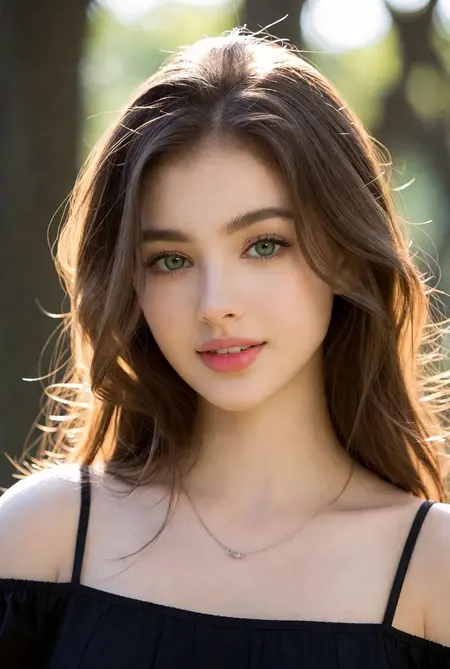
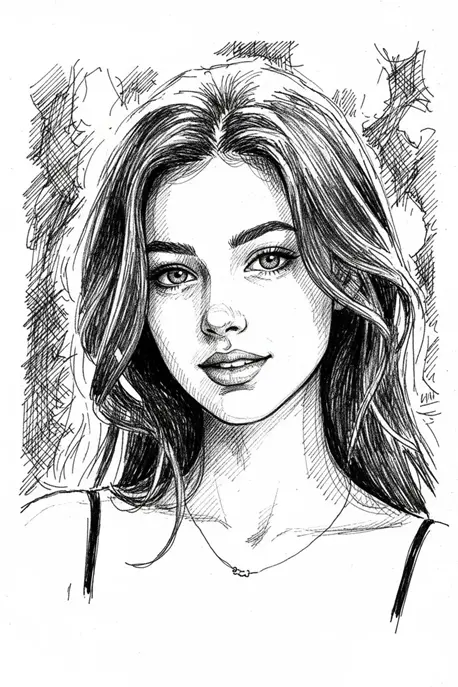
The advantage here isn’t just speed—it’s iteration. You can try multiple variations quickly, which is often more valuable than spending time perfecting a single attempt.
At this point, your photo to sketch conversion becomes less about effort and more about choosing the result that fits your intention.
What Makes a Portrait “Sketch-Ready”
If you want better results, the input image matters more than the tool. Not every portrait will convert cleanly, but small choices can make a big difference.
Lighting Direction Matters
Side lighting or soft natural light works best because it creates depth. Flat lighting (like harsh front-facing flash) reduces shadows, which makes the sketch look less defined.
Expression and Pose Influence the Result
Subtle expressions often translate better than exaggerated ones. A relaxed face with natural shadows tends to produce more balanced sketches.
Background Simplicity Helps
A busy background competes with the subject. Even though some tools try to isolate the face, simpler backgrounds usually lead to cleaner outputs.
Resolution Still Counts
Higher-resolution images preserve more detail during processing. Even though the final result is simplified, starting with a sharp image improves edge detection.
Practical Ways to Use Portrait Sketches
Once you’ve converted a portrait, the result can be used in more ways than just visual experimentation.
Profile Pictures That Stand Out
Sketch-style avatars are visually distinct without being overly stylized. They work well across platforms where you want something recognizable but slightly different from a standard photo.
Creative Assets for Content
If you’re creating content—blogs, videos, or social posts—sketch portraits can be used as:
- Thumbnails
- Section visuals
- Personal branding elements
They add variation without requiring a full design workflow.
Base Layers for Digital Art
Artists often use pencil sketches as a starting point. You can import the sketch into drawing software and:
- Trace over it
- Add color
- Refine details
This speeds up the early stages of illustration significantly.
Personalized Prints and Gifts
Sketch portraits are easy to print and frame. Because they resemble hand-drawn artwork, they feel more personal than standard photos.
Small Adjustments That Make a Big Difference
Even though the process is fast, a few tweaks can noticeably improve your results.
Crop Before You Upload
Focusing on the face (instead of the full scene) helps the tool prioritize important details.
Increase Contrast Slightly
A small boost in contrast can make edges more defined, which improves the final sketch clarity.
Try Multiple Versions
Don’t rely on a single output. Even small variations in processing can change how shadows and lines appear.
Avoid Over-Editing
Heavy filters or beauty edits before conversion can reduce detail. It’s usually better to start with a natural image.
Conclusion
Portraits are one of the easiest and most effective ways to explore the photo to sketch workflow. Because they naturally contain structure, contrast, and emotion, they translate well into pencil-style visuals with minimal effort.
With modern tools, what used to take significant time can now be done in seconds. The real value isn’t just speed—it’s the ability to experiment, iterate, and find a result that matches your intent without getting stuck in technical steps.
If you start with a strong portrait and make a few thoughtful adjustments, you’ll consistently get clean, expressive sketches that are ready to use in a wide range of creative contexts.
Also Read-Innovative Technologies in Metalworking Equipment

Leave a Comment