
Most people think the challenge of online learning is understanding the material.
In my experience, that’s only half the story.
The real challenge often appears weeks later.
You’ve finished a course. You’ve taken notes. You’ve even applied some of what you learned. Then one day, while working on a project, you remember a useful framework, strategy, or example from a lesson. You know the information exists somewhere in the course, but you can’t remember where.
Was it in Module 2?
A bonus lesson?
A live Q&A session?
Before long, you’re clicking through chapters, dragging video timelines, and rewatching sections you already understand just to find one specific idea.
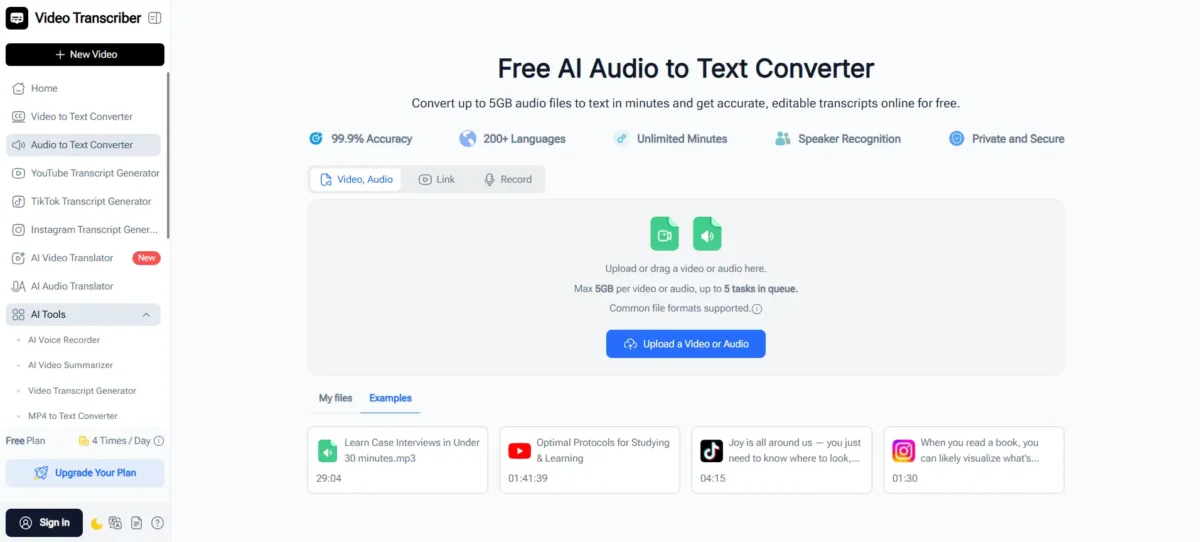
That’s exactly why I started using an audio to text workflow for online courses. What began as a simple way to convert audio to text quickly became a much better way to review, revisit, and retain what I had already learned.
Today, whenever I complete a course, I use Video Transcriber AI to transcribe audio to text (https://videotranscriber.ai/ai-audio-to-text-converter) and turn lessons into searchable learning resources instead of leaving them trapped inside video files
Why Reviewing Online Courses Often Feels Inefficient
Courses Are Designed for Learning, Not Retrieval
Most online courses are structured to help students progress from beginner to advanced concepts.
That works well when you’re learning something for the first time.
The problem comes later when you need to revisit specific information.
A typical course might contain:
- Frameworks
- Step-by-step tutorials
- Real-world examples
- Case studies
- Templates
- Best practices
- Common mistakes to avoid
The more valuable the course is, the more information it usually contains.
Unfortunately, that also makes it harder to find a specific lesson after you’ve completed the course.
Important Knowledge Gets Buried Inside Hours of Video
Many of the courses I take today contain several hours of content.
Some include lengthy workshops, bonus modules, recorded coaching sessions, or live Q&A recordings.
The information is there, but accessing it later can be surprisingly difficult.
I found myself spending more time searching for information than actually reviewing it.
That’s when I realized I didn’t need another note-taking system.
I needed a better way to transcribe audio to text and make course content searchable.
How Audio to Text Changed the Way I Review Courses
Search Is Faster Than Rewatching
The biggest advantage of using an audio to text converter is that it changes how you interact with course material.
Instead of treating lessons as videos, I start treating them as searchable knowledge.
Once I convert audio to text, I can quickly search for:
- Keywords
- Framework names
- Tools
- Strategies
- Questions
- Industry terminology
Rather than rewatching an entire lesson, I can immediately locate the section that contains the information I need.
This simple change has saved me countless hours.
Course Knowledge Becomes Easier to Reuse
One thing I didn’t expect was how much easier it became to apply what I learned.
When information is searchable, it’s more likely to be used.
Instead of relying on memory, I can quickly revisit concepts while working on real projects.
Whether I’m writing content, building a marketing campaign, improving a workflow, or learning a new skill, I can easily find the exact lesson that relates to the task at hand.
The course becomes a reference library instead of a one-time learning experience.
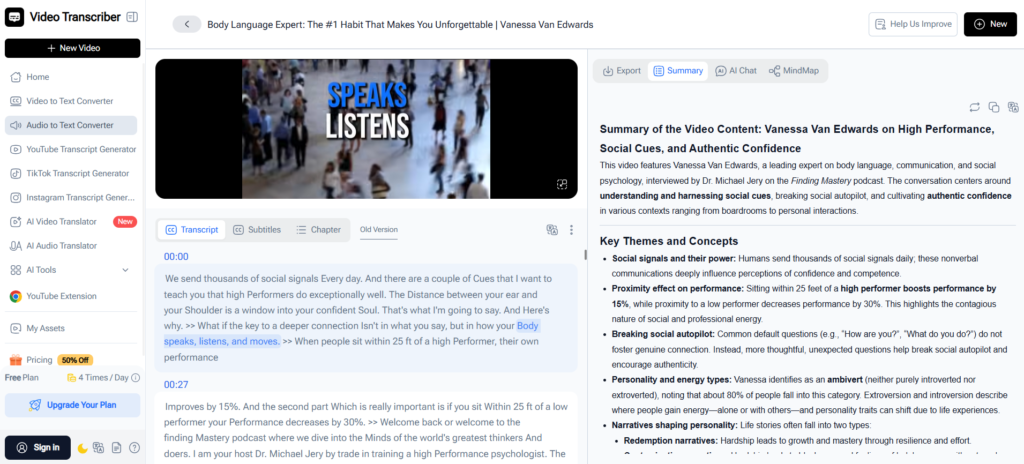
(Video Transcriber AI’s Audio to Text Converter generates searchable text AI summaries)
Why AI Summary Makes Course Review More Practical
Reviewing Everything Isn’t Always Necessary
One challenge with online courses is volume.
A single course can generate thousands of words of transcript.
Reading every lesson from beginning to end isn’t always the most efficient way to review.
This is where AI Summary has become one of my favorite features in Video Transcriber AI.
Before diving into a full transcript, I often review the AI-generated summary to quickly understand:
- Main concepts
- Key takeaways
- Actionable insights
- Important frameworks
- Recurring themes
Within minutes, I can refresh my memory and identify which sections deserve deeper review.
AI Summary Helps Reinforce Learning
Another benefit is retention.
Many learning experts talk about the importance of reviewing material multiple times. The challenge is finding a practical way to do that.
AI Summary makes it easier to revisit key concepts without committing to hours of video playback.
Instead of rewatching an entire lesson, I can quickly review the most important ideas and return to specific sections only when necessary.
How Timestamps Help Me Return to the Right Lesson
One concern people sometimes have about transcripts is context.
A transcript tells you what was said.
A timestamp tells you where it was said.
This combination is incredibly useful for online learning.
When I find a useful concept in a transcript, I can immediately jump back to the exact moment in the lesson where it was explained.
That means I can review:
- Demonstrations
- Visual examples
- Instructor explanations
- Supporting context
without manually searching through hours of content.
The transcript helps me find information.
The timestamps help me reconnect with the lesson.
A Real Example: Revisiting a Marketing Course
Recently, I was working on a content strategy project and remembered a useful framework from a marketing course I had completed months earlier.
I could remember the concept itself.
I could not remember where it appeared.
The course contained several modules and many hours of lessons. Rewatching everything would have been unrealistic.
Instead, I used Video Transcriber AI to convert audio to text and review the transcript.
After searching for a few relevant keywords, I quickly located the section where the framework was discussed. The timestamps allowed me to jump directly back to the lesson and review the instructor’s explanation in context.
What could have taken an hour ended up taking only a few minutes.
Experiences like this are why I now use an audio to text converter for nearly every course I complete.
Why Video Transcriber AI Works Well for Online Courses
Built for Long Educational Content
Many educational resources today are substantial.
Online courses, workshops, bootcamps, and training programs often contain large video files and lengthy recordings.
Video Transcriber AI supports files up to 5GB, making it practical for processing long-form educational content without splitting files into smaller segments.
No Sign-Up Required to Start
One thing I appreciated immediately was how easy it is to get started.
Instead of creating an account and going through multiple setup steps, I can simply upload content and begin using the audio to text converter right away.
That simplicity makes it easy to incorporate into my learning workflow.
More Than Just an Audio to Text Converter
While the ability to convert audio to text is the foundation, the combination of features is what makes the platform particularly useful for students and lifelong learners.
Features I regularly use include:
- Audio to text conversion
- AI Summary
- Timestamp tracking
- Speaker identification
- Online transcript editing
- Support for 200+ languages
- Long-form file processing
Together, these features make reviewing course content significantly easier than relying on video alone.
Final Thoughts
One of the biggest mistakes I used to make was treating online courses as content I consumed once and then moved on from.
The reality is that some of the most valuable lessons reveal their value only after you begin applying them.
That’s why audio to text has become such an important part of my learning process. By using Video Transcriber AI to convert audio to text (https://videotranscriber.ai/ai-audio-to-text-converter), generate searchable transcripts, review AI-powered summaries, and navigate lessons with timestamps, I can spend less time searching through courses and more time using what I’ve learned.
If you’ve invested time and money into online learning, don’t let valuable knowledge disappear inside hours of video.
Turn your lessons into searchable resources and make every course easier to review, revisit, and apply long after you’ve completed it.
Also Read-Innovative Technologies in Metalworking Equipment

Leave a Comment