
Introduction
Portrait photography has evolved dramatically in recent years. What once required advanced editing skills and time-consuming workflows can now be done in seconds using artificial intelligence. From casual smartphone users to professional photographers, many people are turning to automated tools to enhance their images.
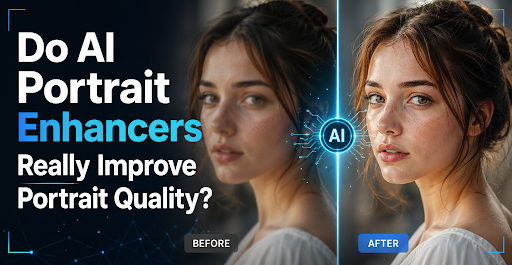
Among these tools, the AI portrait enhancer has gained significant attention. It promises to fix blurry images, improve lighting, and even refine facial features with minimal effort. But this convenience raises an important question: are these tools genuinely improving portrait quality, or are they just applying generic filters that sometimes do more harm than good?
To answer that, we need to explore how AI portrait enhancement works, where it excels, and where it still falls short.
Quick Answer
Yes, AI portrait enhancers can significantly improve portrait quality by automating complex edits like sharpening, noise reduction, and upscaling. However, the best results come from balanced use rather than relying entirely on automation.
1. What Is An AI Portrait Enhancer?
An AI portrait enhancer is a software solution powered by machine learning algorithms that automatically improves portrait images. It analyzes elements such as facial structure, lighting, color balance, and texture, then applies targeted adjustments to enhance the overall image quality.
Unlike traditional editing tools, which require manual control over every detail, an AI portrait editor simplifies the process. It detects faces, identifies key features like eyes and skin, and optimizes them intelligently. This makes it accessible even for users with little to no editing experience.
A related concept is AI portrait retouching, which focuses specifically on refining facial features. This includes smoothing skin, removing blemishes, adjusting tones, and enhancing expressions while aiming to keep the subject looking natural.
Overall, these tools are designed to save time, reduce effort, and deliver professional-looking results with minimal input.
2. How AI Portrait Enhancers Actually Improve Images?
AI portrait enhancers rely on deep learning models trained on vast datasets of high-quality images. By comparing your photo to these learned patterns, the system predicts how to improve it. Let’s break down the key enhancement techniques.
2.1 Sharpening and De-blurring
One of the most common issues in portrait photography is lack of sharpness. Whether caused by motion, focus errors, or camera limitations, blur can reduce image quality significantly.
AI tools address this by analyzing edges and important facial features. Instead of applying a uniform sharpening filter, they enhance specific areas like eyes, eyelashes, and hair strands. This selective approach produces clearer results without exaggerating noise.
In many cases, AI can even reconstruct missing details, making slightly blurred images appear much sharper and more defined.
2.2 Noise Reduction and Low-Light Fixes
Low-light conditions often introduce grain and color inconsistencies. Traditional noise reduction methods tend to blur fine details along with noise, but AI takes a smarter approach.
By distinguishing between actual image data and unwanted noise, AI can clean up the image while preserving texture. It also improves exposure, balances highlights and shadows, and restores natural skin tones.
This makes AI especially useful for portraits taken indoors, at night, or in other challenging lighting environments.
2.3 Upscaling and Resolution Boosts
Another powerful feature is AI-driven upscaling. Standard resizing methods stretch pixels, leading to blurry results. AI, however, generates new details based on learned image patterns.
This allows users to increase image resolution without sacrificing quality. A small, low-resolution portrait can be transformed into a larger, sharper image suitable for printing or professional use.
This capability is particularly valuable for restoring old photos or enhancing images captured on older devices.
3. Where AI Portrait Enhancers Truly Shine?
AI portrait enhancers deliver the most value in practical, real-world situations. Here are some areas where they stand out:
1. Restoring Old Photos
AI can revive aged or damaged portraits by enhancing details, correcting faded colors, and reducing imperfections. This is especially useful for preserving family memories or historical images.
2. Social Media and Content Creation
For influencers and everyday users, AI tools provide quick and attractive enhancements. Features like skin smoothing and the ability to enlarge eyes in portraits help create visually engaging images that perform well online.
3. Professional Photography Workflow
Photographers can use AI as a starting point for editing. It speeds up repetitive tasks like sharpening and color correction, allowing professionals to focus on creative adjustments.
4. Business and Branding Use
Companies benefit from consistent, high-quality portraits for marketing and branding. AI ensures uniformity across multiple images, which is essential for maintaining a polished visual identity.
4. Where AI Still Struggles in Portrait Enhancing?
Despite its advantages, AI is not perfect. There are still limitations that users should be aware of:
1. Over-Processing
AI sometimes applies excessive smoothing or sharpening, resulting in an unnatural or “plastic” look. This can reduce the authenticity of the portrait.
2. Misinterpretation of Features
In complex images, AI may misidentify details or produce distortions. Unique facial characteristics or unusual lighting can confuse the system.
3. Limited Artistic Control
While AI is efficient, it doesn’t always align with a user’s creative vision. Manual editing still offers greater control for achieving specific styles or effects.
5. How to Get the Best Quality from AI Portrait Enhancers?
To achieve optimal results, it’s important to use AI tools thoughtfully. Here are some practical tips:
1. Start with a Good Base Image
AI can enhance quality, but it cannot completely fix severely damaged photos. Better input leads to better output.
2. Choose Reliable Tools Like Leawo Photo Enhancer
Using a trusted solution such as Leawo Photo Enhancer ensures more accurate and natural-looking results. High-quality tools are trained on better datasets and produce fewer artifacts.
3. Keep Adjustments Subtle
Avoid pushing enhancements to extremes. Natural-looking portraits are usually more appealing than overly edited ones.
4. Combine AI with Manual Editing
For best results, use AI to handle basic improvements, then refine the image manually. This hybrid approach balances efficiency with precision.
6. Conclusion
AI portrait enhancers have transformed image editing by making powerful tools accessible to everyone. They can sharpen details, reduce noise, fix lighting issues, and even increase resolution—all in a matter of seconds.
However, their effectiveness depends on how they are used. While they can significantly improve portrait quality, they are not a complete replacement for human creativity and judgment.
Ultimately, AI portrait enhancers work best as supportive tools. When used carefully and combined with manual adjustments, they can elevate portraits to a professional level while maintaining a natural and authentic look.
Read more: Proven techniques to improve accumulator bets on the football success rate
Comprehensive Guide to Skin Cancer Check in Wollongong: Early Detection Saves Lives
Enhancing Business Integrity through Comprehensive Audit & Assurance Services

Grace Mitchell is a content writer at GrammerWay, focused on English grammar, clear writing, and common language mistakes. She creates simple, reader-friendly guides to help improve writing confidence.
Leave a Comment