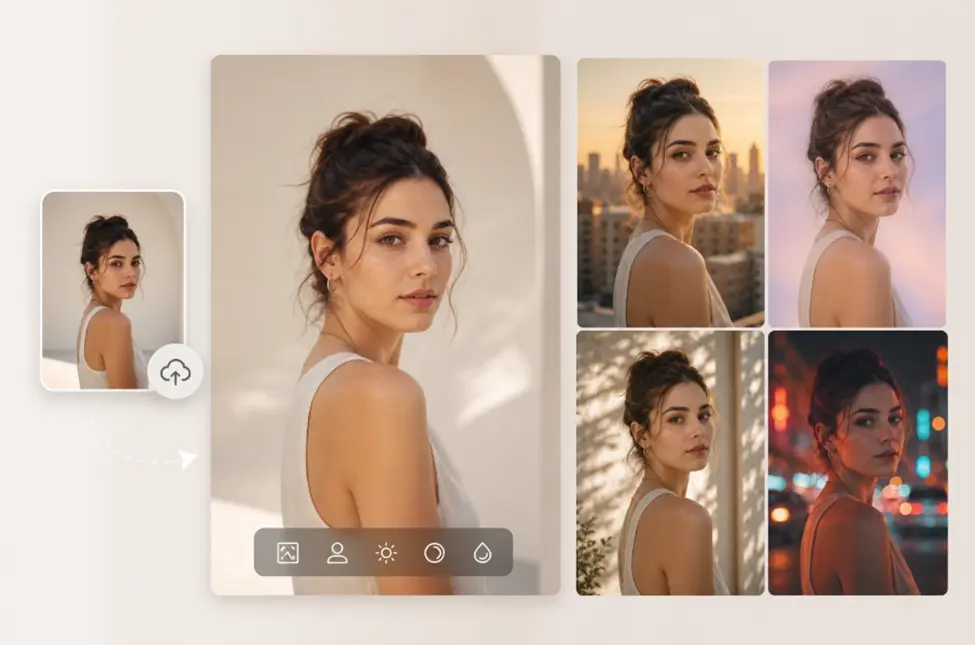

Low resolution images often ruin a good project. You might have a perfect photo that looks blurry or pixelated when you try to use it for something big. This happens because the file does not have enough data to fill a larger space. When you stretch a small image, the computer tries to fill the gaps, which usually results in a fuzzy mess.
Using a high quality image upscaler 16k allows you to fix these issues by adding missing pixels intelligently. Instead of just stretching the existing colors, the software analyzes the shapes and textures to recreate details that were never there. This process turns a standard photo into a massive, clear visual that stays sharp even when viewed up close.
This technology is especially useful when you want to create a Talking Photo for your social media or marketing campaigns. High resolution source files ensure that the facial movements look natural and the textures of the skin or clothing remain realistic. If your original portrait is too small, the animation will look blocky and unprofessional, which is why upscaling is a vital first step.
Real World Scenarios for 16K Upscaling
Large Scale Printing and Outdoor Advertising
Printing a photo on a large banner or a billboard requires an immense amount of detail. A standard photo taken on a phone might look great on a screen, but it will fall apart when printed three meters wide. Most printing services require a high dots per inch count to ensure the final product looks professional. If the resolution is too low, the edges of objects will look jagged and the colors will bleed into each other.
An upscaler allows photographers and marketers to take existing assets and prepare them for large format displays. You can take a 1080p image and transform it into a 16K file that holds its integrity on a massive scale. This saves time and money because you do not always need to reshoot a scene with expensive high end cameras just to get a larger file size.
Digital Art and AI Generation Portfolios
Many digital artists and AI creators face a common problem where their software generates images at a limited size. While a 1024×1024 pixel image looks fine on a phone, it is not large enough for a professional portfolio or for selling as a digital download. Artists need a way to increase the size of their work without losing the fine brushstrokes or intricate patterns they worked hard to create.
By using a 16K upscaler, artists can prepare their work for high resolution monitors and digital galleries. It allows the viewer to zoom in on specific parts of the artwork to see the detail without seeing square pixels. This level of clarity makes the art feel more valuable and professional, which is important for anyone looking to sell their work or build a following online.
Restoring Old Family Memories
Old digital photos from the early 2000s are often very small. Cameras back then did not have the sensors we have today, so many cherished memories are trapped in tiny files that look terrible on modern 4K screens. When you try to view these photos on a new laptop or television, they appear tiny or extremely blurry.
Upscaling these photos helps bring them into the modern era. You can take a grainy photo of a grandparent or a childhood vacation and make it look like it was taken much more recently. The AI fills in the gaps in the old data, smoothing out the noise and sharpening the features of the people in the photo. This makes it possible to print these old memories in a photo book or display them in a digital frame without the quality looking dated.
Printing Benefits
The primary benefit for printing is the elimination of pixelation. When you upscale to 16K, you provide the printer with enough information to create smooth lines. This is crucial for text and logos that need to be readable from a distance. High resolution files also allow for better color grading because there is more data for the printer to interpret, leading to more vibrant and accurate physical prints.
Digital Art Benefits
For digital artists, the main benefit is the ability to showcase fine details. A 16K image allows a user to crop into a small section of the art and still have a high resolution piece. This flexibility is great for creating social media teasers or selling different versions of the same piece. It also ensures that the art looks crisp on the latest high density displays, which are becoming the standard for art collectors.
Restoration Benefits
When restoring old photos, the biggest benefit is emotional impact. Seeing a clear version of a blurry memory can be very powerful. The upscaling process removes the digital noise that often plagues old files, making the subjects look more lifelike. It also allows you to enlarge these photos for framing, turning a small digital file into a physical piece of decor that looks great on a wall.
Practical Workflow for Sharper Visuals
To get the best results, you need a clear workflow. Start by selecting your source image. The better the original quality, the better the final 16K result will be. Even though the AI can fix a lot of problems, it still needs a decent foundation to work from. Avoid images that have too much motion blur or are extremely dark, as the AI might struggle to identify the correct shapes.
Upload your file to the upscaler and select the 16K output option. The processing time will vary depending on the complexity of the image and the speed of the server. Once the upscaling is complete, download the file and inspect it at 100 percent zoom. Look for any areas where the AI might have created strange textures and adjust the settings if necessary.
After you have your high resolution file, you can move on to other creative steps. For example, if you are working on a marketing video, you can now use this sharp image as a background or a character base. The extra pixels give you the freedom to move the camera around the image or zoom in during the video without the quality dropping. This makes your final video look much more expensive and professional.
Finalize your project by saving the file in a format that supports high resolutions, such as a PNG or a high quality JPEG. If you are printing, make sure to check the color profile to ensure the colors on your screen match what comes out of the printer. With a 16K file, you have the ultimate flexibility to use your visual assets anywhere you want.
Conclusion
Creating sharper visuals is no longer a difficult task reserved for professional editors with expensive gear. An image upscaler 16k gives everyone the power to improve their photos, art, and designs with just a few clicks. You can turn small, unusable files into massive assets that look great on any screen or printed surface.
By following a simple workflow and understanding how to apply upscaling to different scenarios, you can significantly improve the quality of your work. Clearer images lead to better engagement, more professional presentations, and better preserved memories. Start using these tools today to ensure your visuals always look their best.
Also Read
- https://grammerway.com/transform-your-home-with-stylish-area-rugs-in-australia/
- https://grammerway.com/comprehensive-guide-to-effective-tattoo-removal-at-evolution-laser-clinic/
- https://grammerway.com/comprehensive-guide-to-effective-tattoo-removal-at-evolution-laser-clinic/





Leave a Comment